Google Ads works for plumbers, electricians, roofers and builders when three things are true: you only pay for searches from people who want a job doing now, your ads only show near where you're actually based, and you can see which clicks turned into phone calls. Get those right, give a new campaign three to four weeks to learn, and paid search is one of the fastest ways a trade business can fill the diary. Get them wrong and it's one of the fastest ways to waste money.
This article is part of my guide to marketing for tradespeople.
I ran a plumbers' merchants for 16 years before moving into digital marketing in 2019, so I've spent a long time on the other side of the counter from tradespeople, hearing what worked for them and what didn't. Now I manage Google Ads for trade businesses, and I'm Google Ads certified in Search, Performance Max and Shopping. This guide is how I actually set up and run campaigns for trades, with real UK click costs and the settings I change on every new account.

Is Google Ads right for your trade business?
Before spending anything, check that the numbers can work. Google Ads charges per click, whether or not the person rings you, so the question is whether your jobs are valuable enough to cover the clicks it takes to win one.
Here's a simple worked example with illustrative numbers. Say your clicks cost £6, one in ten clicks becomes an enquiry, and you win four in ten enquiries. That's 25 clicks per job won, or £150 of ad spend per job. If your typical job is a £120 tap repair, that doesn't work. If it's a £2,500 boiler installation or a £4,000 rewire, it works comfortably. My PPC ROI calculator lets you plug in your own figures.
Google Ads tends to suit trades that:
- Have a decent average job value, or a good chance of repeat work from a new customer.
- Can answer the phone, or have someone who can, during the hours the ads run.
- Have capacity for more work now, not in six months.
- Have a website with a page for each main service, or are willing to get one.
If you're fully booked from word of mouth, don't spend money on ads. If you need work in the diary within weeks rather than months, ads are usually the quickest route, and SEO is the longer-term one. If you're new to how paid search works, start with my beginner's guide to what PPC advertising is.
What trade clicks cost in the UK right now
Here's what trade clicks cost right now, which is the starting point for working out how much Google Ads cost in the UK for your business. These are UK-wide figures from Google's Keyword Planner data (via DataForSEO, September 2026). "Top of page bid" is Google's estimate of what advertisers have paid to appear at the top of the results. Your own costs will vary with your area, your competitors and how good your ads and landing pages are.
| Search term | UK searches a month | Top of page bid (low to high) |
|---|---|---|
| plumber near me | 90,500 | £2.09 to £13.41 |
| emergency plumber | 12,100 | £5.53 to £37.19 |
| boiler repair | 5,400 | £3.90 to £14.77 |
| boiler installation | 4,400 | £7.80 to £25.98 |
| gas engineer near me | 8,100 | £2.30 to £11.87 |
| electrician near me | 74,000 | £2.02 to £10.29 |
| emergency electrician | 4,400 | £4.47 to £23.13 |
| roofer near me | 33,100 | £3.75 to £17.93 |
| roof repair | 6,600 | £4.17 to £17.16 |
| builders near me | 18,100 | £1.54 to £6.18 |
Two things jump out. First, "emergency" searches are among the most expensive clicks a small business can buy, because they convert quickly and everyone wants them. Second, the spread between low and high is huge. Where you land in that range depends a lot on how tightly the campaign is built, which is what the rest of this guide is about.
Which type of campaign should a tradesperson use?
Start with Search. Search ads show when someone types what they need, such as "boiler installation near me" or "electrician Croydon". These are people with a job and a phone in their hand. You choose the keywords, you control the area, and you can see exactly which searches you paid for. For almost every trade client I take on, Search is the first campaign.
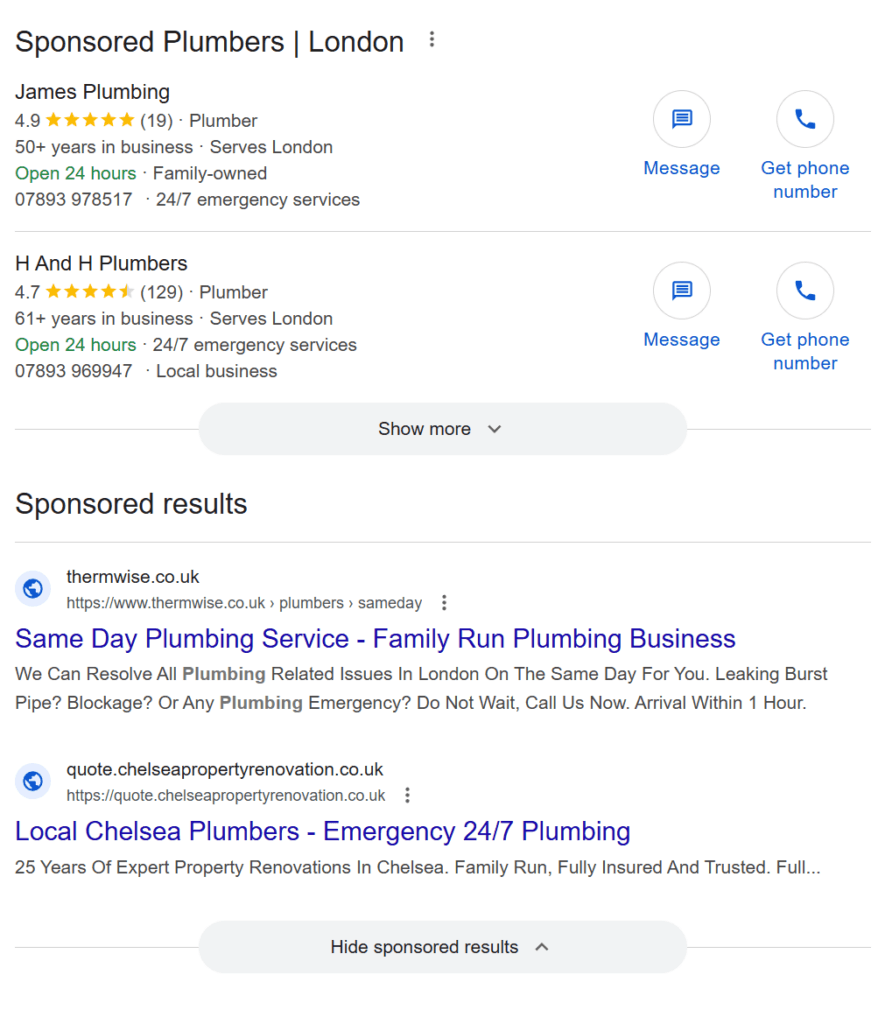
Consider Local Services Ads alongside it. Local Services Ads are Google's pay-per-lead listings with a verification badge and star rating, and they usually sit at the top of the page for trade searches. In the UK they're available for plumbers, electricians, roofers, HVAC and general contractors, among others. Since late 2025 the old Google Guaranteed and Google Screened badges have been replaced by a single Google Verified badge, and the money-back guarantee has gone. There's more to Local Services Ads in the UK than I can fit here, including the checks, how leads are charged and why UK advertisers don't get automatic credits for bad leads.
Be careful with Performance Max. Performance Max spreads one budget across Search, YouTube, Display, Discover, Gmail and Maps, with far less control over where the money goes. It can work for businesses with plenty of reliable conversion data. For a small trade business that mostly gets phone calls, I rarely start there, because it tends to find cheap clicks and form spam before it finds customers.
How I set up Google Ads for trades
This is the part that separates an account that pays from one that doesn't. None of it is clever. It's just done every time.
1. Only bid on searches that mean "I need a tradesperson"
I deliberately exclude anything that isn't directly transactional. There's enough qualified search volume in most trades that you don't need to pay to work out what an ambiguous searcher meant. "Gas near me" could be someone who needs a gas engineer, or someone looking for a gas bottle. "Boiler" could be a homeowner, a student or someone comparing brands for a job three years away. I'd rather not pay to find out.
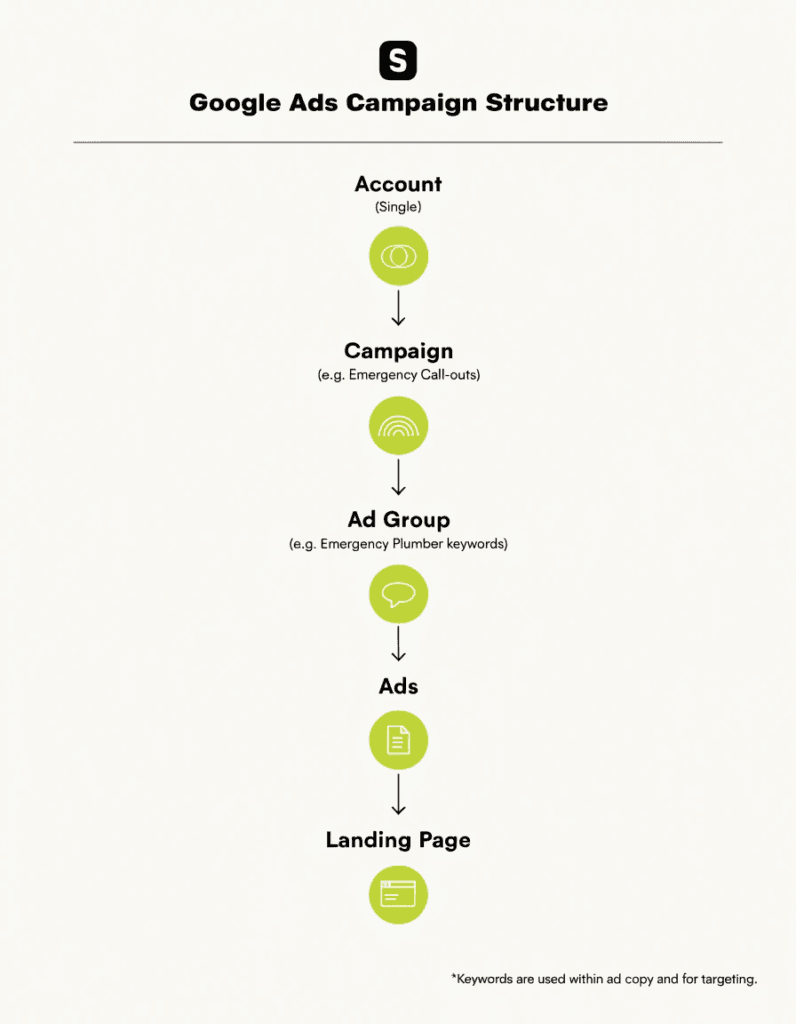
Build separate ad groups for each service you actually want more of, such as boiler installation, emergency call-outs or rewires, so each has its own keywords, its own ads and its own landing page.
2. Start with negative keywords already in place
Getting negative keywords and the search terms report right is the single biggest lever on wasted spend. A plumber without negatives will pay for "plumbing jobs", "plumbing course", "how to fix a dripping tap" and "plumber salary". Every one of those clicks costs the same as a real customer.
I keep shared negative keyword lists that apply across every account I manage, split into three: a trade list (jobs, training, DIY, trade suppliers and so on), a places list (towns and areas the client doesn't cover) and a generic list (free, cheap, salary, reviews of the kind that never convert). Every new campaign starts with years of exclusions already applied, rather than learning them one expensive click at a time.
Then I check the search terms report daily in the early weeks. The aim on every account is to push unwanted paid clicks as close to zero as possible. Bear in mind Google's search terms report leaves out some low-volume terms for privacy, so what you can see is a sample of what you're paying for.
3. Target where you're based, not everywhere you'd go
Google's default location setting reaches people "in, regularly in or who've shown interest in" your target area, according to its location targeting help page. For a trade business, someone 200 miles away who once looked at your town isn't a customer. I switch campaigns to "Presence" so ads only show to people who are in, or regularly in, the area.
I also target tightly around where the business is physically based, rather than the whole service area the owner would travel to, as long as the budget is comfortably spent in the smaller radius. Jobs close to base mean less travel, more jobs a day and customers who are more likely to pick a local firm. If the budget isn't being spent, I widen it gradually.
One point I have to explain often: having location pages on your website for 30 towns is an SEO asset. It doesn't mean your paid campaigns should target all 30 towns. Ad targeting should follow where the profitable work is.
4. Check the settings Google turns on for you
- Search partners. Google says search partners are included by default in Search campaigns. Compare their cost per lead with Google Search before keeping them.
- AI Max. Google has said that from September 2026, campaigns using the campaign-level broad match setting or automatically created assets are being upgraded to AI Max automatically. AI Max can match your ads to searches beyond your keywords. If your account started behaving differently this month, check whether it's been switched on.
- Auto-applied recommendations. Check whether Google has permission to change your keywords, bids or budgets for you, and switch off anything you haven't consciously agreed to.
5. Track phone calls, not just forms
Most trade enquiries are phone calls. If you only track the contact form, Google thinks your best ads are failing. Getting Google Ads conversion tracking right for calls is where most trade accounts I look at fall down. Google's call reporting uses a Google forwarding number on your call assets so you can count calls over a set length as conversions, and you can also track calls to the number on your website.
For my clients, I measure leads: who actually got in touch. Reports show totals by source and type, spend and cost per lead. Clicks and impressions help with diagnosis, but they don't pay for the van.
6. Send each ad to the right page
Someone who searched "emergency boiler repair" and lands on a homepage about bathroom fitting will go back and ring the next firm. Each ad group should go to a page about that service, with the phone number visible without scrolling and tap-to-call on mobile, your area, your accreditations, real photos and reviews. My guide to building a high-converting plumbing landing page goes through it step by step, and it applies to any trade.
7. Start small, then scale
I start new Search campaigns on a low budget using Maximise clicks until there's real conversion data, then move to a conversion-based bid strategy and scale up. Switching straight to Maximise conversions with no history asks Google to optimise towards something it hasn't seen yet. Google's own guidance on the bid strategy learning period says it can take up to around 50 conversions or three conversion cycles to calibrate.
In my experience, a new campaign typically needs three to four weeks to reach the point where Google has learned how best to convert. What resets that progress is constant tinkering. Make one meaningful change, give it time, then judge it. If you're already running a campaign and want to improve it, my guide on how to optimise your PPC campaigns covers what to change and in what order.
8. Check it every week
I run a report across every account I manage each Monday, so if a campaign is underspending or impressions are weak, I know within the first week rather than at the end of the month. If you're doing it yourself, set a weekly reminder to look at spend, leads, cost per lead and the search terms. If your campaigns show "Limited by budget", my guide to Search lost impression share (budget) explains what it means.
If you're already running ads, the most common reasons why Google Ads get clicks but no calls are the settings in this section: broad searches, a wide location setting, missing call tracking and a weak landing page.
How much should a tradesperson spend?
My view is that £10 a day in ad spend is the realistic minimum, especially for Search and for wider areas. That's roughly £300 a month. Below that, you get too few clicks to learn anything or win enough work to judge it.
On a smaller budget, concentrate rather than spread. One or two of your most profitable services, a tight radius around your base and nothing else until it's working. A £10 a day budget split across ten services and 40 towns gets a couple of clicks for each, which isn't a campaign, it's a lottery.
To judge whether it's paying, work out your return on ad spend (ROAS): the value of jobs won from the ads divided by what you spent. If £1,000 of spend wins £5,000 of work, your ROAS is 5:1. Look at it monthly at first, because week-to-week swings on a small account can be misleading.
Trade-by-trade notes
| Trade | What usually works | Watch out for |
|---|---|---|
| Plumbers and heating engineers | Separate campaigns for emergencies and for installations; boiler installs carry high job values | DIY and "how to" searches, trade supply searches, boiler brand research |
| Electricians | Specific services such as rewires, consumer unit upgrades, EICRs and EV charger installs | Training, apprenticeship and salary searches, which are very common in this trade |
| Roofers | Repair campaigns ready for bad weather; flat roof and replacement work for higher values | Demand swings sharply by season, so budgets need adjusting through the year |
| Builders | Extensions, loft conversions and renovation searches; clicks are cheaper than most trades | Long decision times, so enquiries take longer to turn into work |
The seasonality point for roofers isn't a guess. Keyword Planner data shows UK searches for "roof repair" running at 12,100 a month in September and October 2025 and dropping to 3,600 in May and July 2026. A roofer's budget in summer and in autumn shouldn't be the same.
For more on each trade, including the marketing that doesn't involve Google Ads, see my guides on how to advertise a plumbing business, plumbing lead generation, marketing for electricians, marketing for roofing companies and marketing for builders. If you install heat pumps or air conditioning, I've also written about heat pump leads and air conditioning leads.
The mistakes I see most in trade accounts
- Broad keywords with no negatives, so the account pays for jobs, courses and DIY searches.
- "Presence or interest" left on, with clicks from people nowhere near the service area.
- Only forms tracked, so Google optimises away from the phone calls that actually bring in work.
- Every ad pointing at the homepage.
- Ads running when nobody can answer. People searching for a tradesperson rarely leave a voicemail. They ring the next one.
- Judging it after a week, or changing the bid strategy, budget and ads every few days.
- Accepting every Google recommendation without checking what it will do.
Other ways for trades to get enquiries
Google Ads isn't the only option, and it doesn't have to come first.
- SEO and your Google Business Profile build visibility you don't pay for per click, but take months rather than days. Running SEO and PPC together is often the strongest combination: ads for leads now, SEO so you rely on them less over time.
- Facebook and Instagram ads suit bigger, planned jobs like extensions and bathrooms more than emergency call-outs. I've covered this in Facebook ads for plumbers.
- Recommendation sites can bring in work at a lower upfront cost, though lead quality varies. See my rundown of the best tradesperson recommendation sites in the UK.
If you're not a tradesperson, the same principles apply, and my small business guide to Google Ads covers them for any type of business.
FAQ
Do Google Ads work for plumbers?
Yes, when the campaign only targets people who need a plumber now, only shows near where you're based, tracks phone calls, and sends each ad to a matching service page. Plumbing clicks can be expensive, especially for emergency searches, so the job values need to support the cost per lead.
How much should a tradesperson spend on Google Ads?
I'd treat £10 a day in ad spend as the realistic minimum, around £300 a month, especially for Search and wider areas. On that budget, focus on one or two of your most profitable services in a tight area. Increase spend once you can see the cost per lead is working.
How long does it take for Google Ads to work for a trade business?
Ads can bring enquiries within days of going live. In my experience, though, a new campaign typically needs three to four weeks before Google has learned how best to convert. Check search terms daily during that time, because wasted clicks can be stopped straight away.
Should I use Local Services Ads or normal Google Ads?
If your trade is eligible, often both. Local Services Ads charge per lead and show a Google Verified badge and your star rating. Search ads charge per click but give you control over exactly which searches you pay for and which services you promote. Most of my trade clients who qualify run both.
Should I run Google Ads myself or use an agency?
A tight, local Search campaign is something you can run yourself if you'll check it every week. Where most tradespeople struggle is keeping up the search terms, negatives and tracking while also running jobs. That's the point where paying someone usually saves more than it costs.
Want me to look at your ads?
Google Ads for trades isn't complicated, but it does punish shortcuts. Only pay for real job searches, target where you're based, track calls, send people to the right page and give it time to learn.
If you're running your own ads and they're not paying, I'm happy to take a look and tell you honestly what I'd change. You'll deal with me directly, someone who's spent a long time around the trade. Find out more about my Google Ads management service, see my wider PPC services, or get in touch and tell me about your business.