Most salons still treat their website as an afterthought — a static page with a phone number and a few photos. But the reality is this: when someone in your area searches "hair salon near me" or "balayage in [town]", your website is either working for you or it isn't. There's no middle ground.
This article is part of my small business website guide and my small business marketing guide.
A well-built salon website does three things: it shows up in search results, it convinces visitors you're worth booking, and it makes the booking process effortless. Done right, it's the hardest-working member of your team — taking enquiries at midnight, showcasing your best work, and handling appointments while you're at the chair.
This guide walks you through everything you need to create a salon website that does exactly that.
Does a Salon Really Need a Website?
If you're relying on Instagram or a Facebook page as your main online presence, you're not alone — but you're taking a significant risk. Social platforms can change their algorithms overnight, restrict your reach, or disappear entirely. You don't own that audience.
A website is different. It's yours. It lives on your domain, it shows up in Google, and it works around the clock without you paying for every click.
Here's what a salon website does that social media can't:
- It captures people who are actively searching for a salon — not just scrolling through their feed
- It lets clients book directly without needing to DM you and wait for a reply
- It gives you a permanent home for your pricing, services, and policies
- It builds trust in a way a grid of Instagram photos simply cannot
Studies consistently show that the majority of consumers research a business online before visiting in person. If your website doesn't exist, or it looks outdated, many of those potential clients will simply book elsewhere.
Five Things to Decide Before You Start
Before touching a website builder, take a few minutes to answer these questions. Getting clear on them upfront will save you significant time and frustration later.
1. Will it work on mobile?
More than half of all web searches now happen on a phone. If your website doesn't display correctly on a small screen — if buttons are too small to tap, text spills off the edge, or images load slowly — visitors will leave before they've read a word. Any platform or theme you choose must be mobile-responsive by default.
2. How fast will it load?
Google uses page speed as a ranking factor, which means a slow website doesn't just frustrate visitors — it actively holds you back in search results. Avoid cramming your site full of oversized images, autoplay videos, and unnecessary plugins. Speed matters.
3. Do you want online booking?
An online booking system is one of the most valuable things a salon website can offer. It removes the friction of phoning or messaging, reduces no-shows through automated reminders, and means you're taking bookings even when you're mid-cut. Decide whether you want this before you choose your platform, as some builders make it far easier to integrate than others.
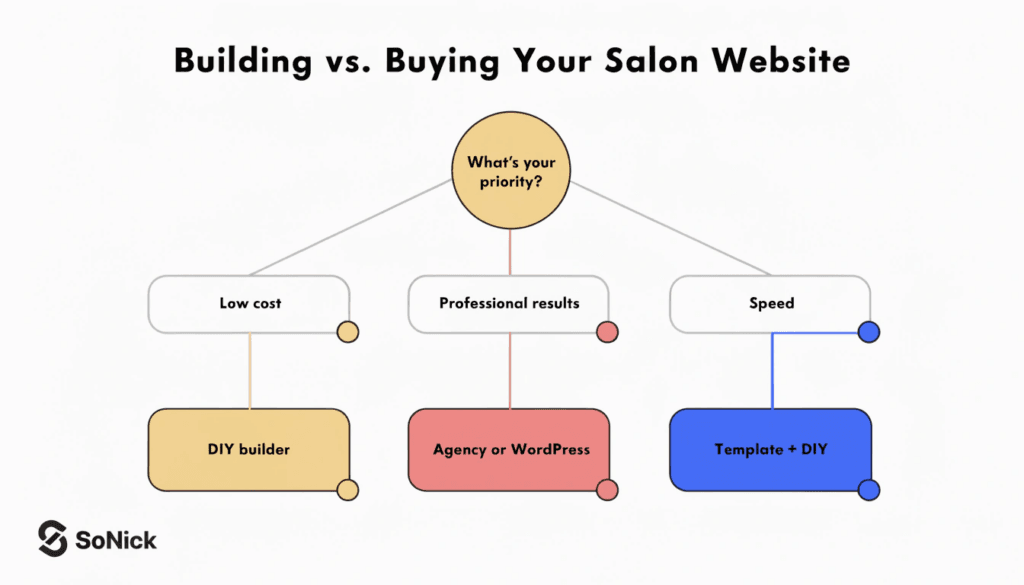
4. Are you building it yourself or hiring someone?
There's no universally right answer here. Building it yourself using a platform like Wix or Squarespace is the most affordable option, and modern builders make it genuinely achievable without technical skills. The trade-off is time, and the result will typically be less distinctive than a professionally designed site.
If you're an established salon looking for something that truly reflects your brand and performs well in search, working with a professional web design agency will almost always produce a stronger outcome — and better long-term results.
5. Who is writing the content?
Content is where most salon websites fall flat. Uploading a list of services is not the same as writing copy that persuades someone to book, or page content that ranks in Google. Think honestly about whether you can produce that yourself, or whether you need help.
How to Build a Salon Website: Step by Step
Step 1 — Choose Your Domain Name
Your domain name is your web address — for example, blossomhairsalon.co.uk. It should be as close to your salon name as possible, kept short, and easy to spell. A .co.uk domain signals to Google and to visitors that you're a UK-based business, which matters for local search.
A few things to keep in mind:
- Avoid hyphens, numbers, or unusual spellings — they're hard to remember and easy to mistype
- If your exact business name is taken, try adding your town (e.g.
blossomhairsalonsurrey.co.uk) - Don't include a specific service in the domain if there's any chance you'll expand your offering later
- Check that the name is available across social platforms too, so your brand is consistent everywhere
Domains typically cost between £10 and £20 per year from a registrar such as 123-reg or Namecheap.
Step 2 — Choose Your Platform
This is one of the most consequential decisions you'll make, so it's worth thinking through carefully.
DIY website builders (Wix, Squarespace) are the most beginner-friendly option. They offer drag-and-drop editing, built-in hosting, and salon-specific templates. If you're just starting out and your budget is limited, these are a perfectly reasonable place to begin. The downside is that customisation has limits, and they're harder to optimise for SEO compared to a self-hosted site.
WordPress is the most widely used CMS in the world, and for good reason. It gives you complete control over your design and content, plays well with SEO plugins, and can grow with your business. It does have a steeper learning curve than Wix or Squarespace, but paired with a good theme or page builder, it's the preferred choice for salons serious about their online presence.
Working with an agency means someone else handles the build, design, and technical setup for you. You get a professional result without needing to learn a platform, and a good agency will build with SEO in mind from the start. If you're ready to invest properly in your website, this is the route I'd recommend.
Step 3 — Plan Your Pages
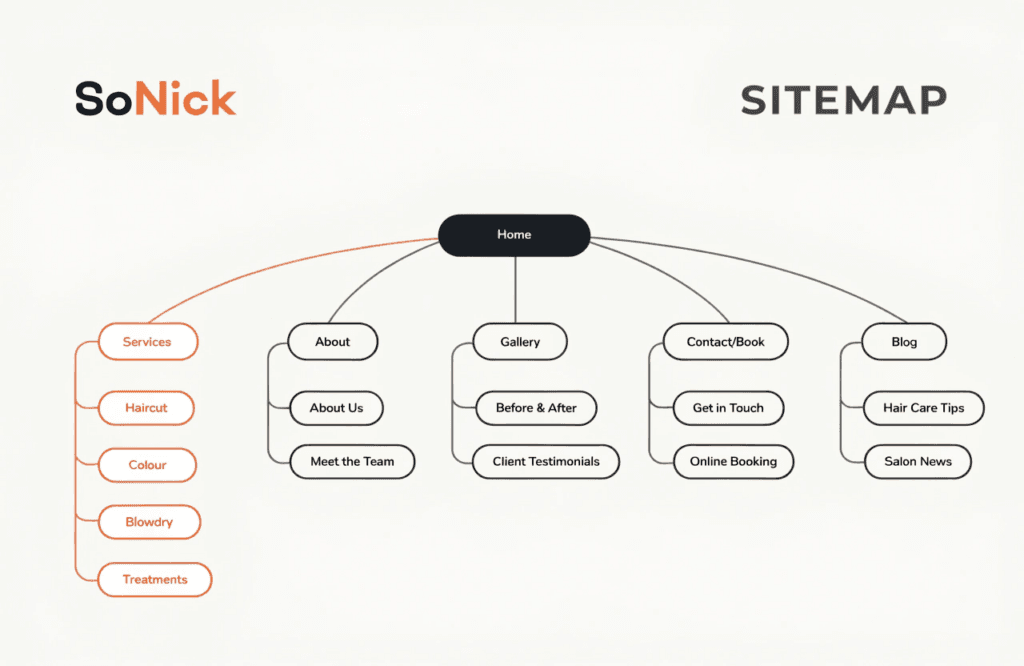
Before designing anything, sketch out the pages your site will need. Think of this as your sitemap — the structure that visitors (and Google) will navigate.
At a minimum, most salon websites need:
- Home — your first impression; needs to be clear, fast, and compelling
- Services — ideally broken out into individual pages per service (more on this below)
- About — your story, your team, and why clients should trust you
- Gallery — your best work; high-quality images only
- Contact — address, phone number, opening hours, and a map
- Book online — or a prominent booking link throughout the site
The services section is particularly important for SEO. A single catch-all "Services" page won't rank for specific searches. Separate pages — one for haircuts, one for colour, one for treatments, and so on — give each service a chance to rank individually.
Step 4 — Design Your Website
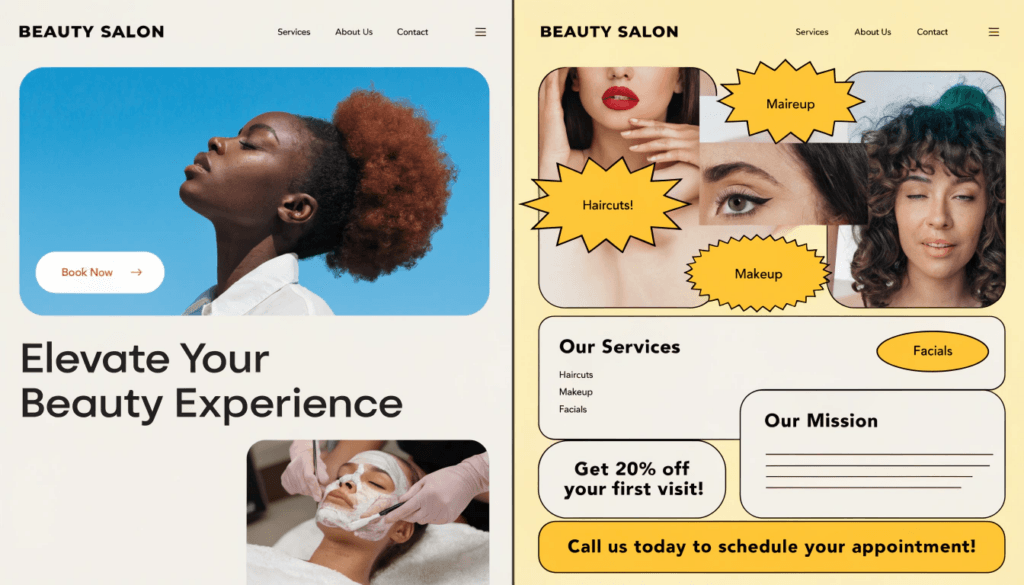
Your website design should feel like an extension of your salon. The colours, typography, and overall aesthetic should match the experience clients have when they walk through your door. A luxury blow-dry bar and a community hair salon serving families serve very different clientele — their websites should reflect that.
Practical design principles to keep in mind:
- Keep navigation simple — visitors should be able to find what they need in two clicks
- Use high-quality imagery — nothing undermines trust faster than blurry or poorly lit photos
- Make your booking button prominent on every page — don't make clients hunt for it
- Use consistent colours and fonts throughout; visual inconsistency looks unprofessional
- Leave white space — cluttered pages are hard to read and harder to act on
If you're having professional photography done (and I'd strongly recommend it for any established salon), schedule the shoot before the site launches. Stock photography is a poor substitute for real photos of your team, your space, and your work.
Step 5 — Write Your Content
This is where most salon websites go wrong. Content isn't just about filling pages with words — it's about writing for two audiences simultaneously: the human visitor you want to book, and Google, which decides whether your page is worth showing in search results.
For each service page, include:
- A clear, keyword-relevant page title (e.g. "Balayage in [your town]" rather than just "Balayage")
- A description of the service and what the client can expect
- Pricing, where possible — many clients won't enquire if they can't get a rough idea of cost
- A call to action or booking link
- Answers to common questions about the service
For your homepage and About page, focus on telling your story in a way that's genuine and specific to your salon. What makes you different from the dozens of other salons in your area? That answer needs to be front and centre.
Step 6 — Add Online Booking
If you're going to add a booking system — and I'd encourage you to seriously consider it — integrate it properly rather than bolting it on as an afterthought.
The best booking systems for salons allow clients to select a service, choose a stylist, and pick a time without leaving your website. They send automated reminders to reduce no-shows, collect client details for your records, and can process deposits or payments upfront.
Popular options include Fresha, Treatwell, and Timely. If you're using WordPress, systems like WP-Amelia integrate directly into your site and keep the booking experience fully on-brand. The key is making the process fast and friction-free — every extra click between "I want to book" and "I've booked" costs you appointments.
Step 7 — Optimise for Search Engines
Getting your site live is only half the job. If Google can't find it, neither can potential clients.
SEO for salons is a topic in its own right, but the essentials to get right from the start are:
Local SEO first. Set up and fully complete your Google Business Profile — this is what drives the map listings that appear when someone searches for a salon near them. Make sure your name, address, and phone number are consistent across your website and every directory listing.
Title tags and meta descriptions. Every page should have a unique title tag (the clickable text in search results) that includes your target keyword. For a page about balayage in Brighton, for example, your title tag might read: "Balayage in Brighton | Blossom Hair Salon".
Page headings. Structure your content with H1, H2, and H3 headings that include the terms your clients are actually searching for.
Image alt text. Every image on your site should have a descriptive alt text. It helps Google understand your content and improves accessibility.
Site speed and mobile performance. Already mentioned in the pre-planning stage, but worth reinforcing — these are both ranking factors.
If SEO feels overwhelming, that's entirely understandable. It's a long-term investment that rewards consistency. The free SEO audit on our site is a good starting point — it'll show you where your current online presence stands and what needs attention.
Step 8 — Launch and Promote
Once your site is live, the work doesn't stop. Tell your existing clients, announce it on your social channels, and update every listing — Google Business, Facebook, Instagram, and any directories you appear in — with your new web address.
Share your new pages on social media as you publish them. If you have an email list, send a launch announcement with a link and perhaps a limited-time offer to drive early traffic.
From there, keep your site fresh. Update your gallery regularly, add blog content around topics your clients care about, and check your analytics periodically to see which pages are driving enquiries and which aren't.
What Pages Does a Salon Website Actually Need?
Beyond the basics covered above, here's a slightly more detailed breakdown of what to include on each core page.
Home page. Lead with a clear headline that tells visitors immediately what you do and where you are. Include a booking button above the fold (the part of the page visible before scrolling), a brief overview of your services, and social proof — reviews, awards, or a gallery preview.
Service pages. One page per service category is the minimum. For a hair salon, that might mean separate pages for cuts, colour services, treatments, and bridal hair. Each page should be written with a specific keyword in mind and include pricing guidance.
About page. People book people, not businesses. Share your story, introduce your team with individual profiles, and let your personality come through. This is one of the most-read pages on most salon websites.
Gallery. Quality over quantity. Thirty exceptional images are worth more than two hundred mediocre ones. Update it regularly and categorise by service where possible.
Booking/Contact page. Make this page do as little work as possible for the visitor — the booking widget should be prominent, your phone number clickable, and your address linked to Google Maps.
How Much Does a Salon Website Cost?
The honest answer is: it depends on what you're building and who's building it.
DIY using a website builder (Wix, Squarespace): Expect to pay somewhere between £150 and £300 per year in subscription costs, plus the cost of your domain. The investment is mainly your time — building a site that looks polished can take considerably longer than the platforms suggest.
WordPress with a premium theme: Hosting typically costs between £50 and £150 per year, a premium theme between £40 and £100 as a one-off, and a domain around £15 per year. This route gives you far more flexibility, but you'll need some technical confidence or a willingness to learn.
Professional agency build: This is where the range widens considerably. A basic professional salon website in the UK typically starts from around £895–£1,500. A more comprehensive build with custom design, SEO foundations, booking integration, and a full content strategy will generally fall between £2,000 and £5,000.
It's worth thinking of your website as an investment rather than a cost. A well-built site that consistently brings in two or three new clients per month will pay for itself many times over.
If you're curious about what a professional build might look like for your salon, take a look at our web design packages — we work with salons and service businesses across the UK.
Frequently Asked Questions
Does a salon need its own website, or is social media enough? Social media is valuable, but it's not a substitute for a website. You don't own your social audience — algorithm changes or platform restrictions can limit your reach overnight. A website gives you full control over how your salon appears online, and it's what shows up in Google when someone searches for a salon in your area.
What is the best website builder for a salon? For beginners on a tight budget, Wix or Squarespace are reasonable starting points — both offer salon-specific templates and are easy to use without technical skills. For anything more ambitious, WordPress gives you far greater control and is the better choice for long-term SEO performance.
How long does it take to build a salon website? A basic DIY site can be pulled together in a weekend if you have your content and images ready. A professionally designed and built site typically takes four to eight weeks, depending on the agency and the complexity of the project.
Do I need a separate booking system, or can it be built into my website? Most website builders allow you to embed a booking widget from a third-party system. If you're using WordPress, you can install a booking plugin that integrates directly into your site. Either way, the goal is to keep the booking process on your website rather than redirecting clients to an external platform — it keeps the experience seamless and keeps people on your site.
Conclusion
Building a salon website doesn't need to be overwhelming. Start with the fundamentals — a clear domain name, a platform that suits your skills and budget, and pages that are written with both your clients and Google in mind. Get the booking system right, add genuine photography of your space and your work, and invest in the SEO basics from day one.
Done well, your website will become the most reliable new-client generator your salon has — working quietly in the background every hour of every day.
If you'd like to see how your current online presence is performing before you start, run a free SEO audit — it takes under a minute and gives you a clear picture of where things stand. Or if you're ready to talk about a new salon website, get in touch and let's discuss what's possible for your business.