Most small business websites have SEO problems they don't know about. Missing title tags, pages Google can't crawl, images slowing everything down, content that duplicates itself. These are not rare edge cases. They're common, they're fixable, and they're quietly holding back your rankings every single day.
This article is part of my small business guide to SEO.
An SEO audit is how you find them.
It's a structured review of your website that looks at the technical foundations, your on-page content, the quality of your pages, and the signals coming from elsewhere on the web. Done properly, it gives you a clear picture of what's working, what isn't, and what to fix first.
You don't need an agency to do a basic audit. You do need to know what you're looking for, and that's exactly what this guide covers.

What Is an SEO Audit?
An SEO audit is a systematic evaluation of your website's health from a search engine optimisation perspective. It covers four main areas:
- Technical SEO. Can search engines find, crawl, and index your pages? Is your site fast and secure?
- On-page SEO. Are your pages properly optimised with the right titles, headings, and content structure?
- Content quality. Is your content genuinely useful, up to date, and free from duplication?
- Off-page SEO. What does your backlink profile look like? Are you sending the right trust signals to Google?
A DIY audit covers the fundamentals across all four areas. A professional audit goes deeper, using more advanced tools, benchmarking against competitors, and building a prioritised action plan. If you want to start with a quick snapshot of where your site stands right now, you can run a free SEO audit on the SoNick Marketing website. It takes under a minute.
What You'll Need Before You Start
You don't need to spend a fortune on tools to audit your own website. Here's what I recommend:
- Google Search Console (free). Essential. Shows you which pages are indexed, what search queries you're appearing for, crawl errors, and mobile usability issues. If you haven't set it up yet, do that first.
- Google PageSpeed Insights (free). Tests your page speed and Core Web Vitals on both mobile and desktop. Just enter any URL and it gives you a score with specific recommendations.
- Screaming Frog SEO Spider (free up to 500 URLs). A desktop crawler that crawls your site the same way Google does. Brilliant for finding broken links, missing title tags, duplicate content, and redirect chains.
- SE Ranking. An all-in-one SEO platform that includes a full site audit tool, keyword rank tracker, backlink checker, and competitor research. It's what I use regularly with clients. You can try it free. Enter your domain or a target keyword below to get a quick sense of what it shows you:
Step 1: Check Your Technical SEO
Technical SEO is the foundation. If search engines can't crawl and index your pages properly, nothing else matters. Your content could be excellent and it still won't rank.
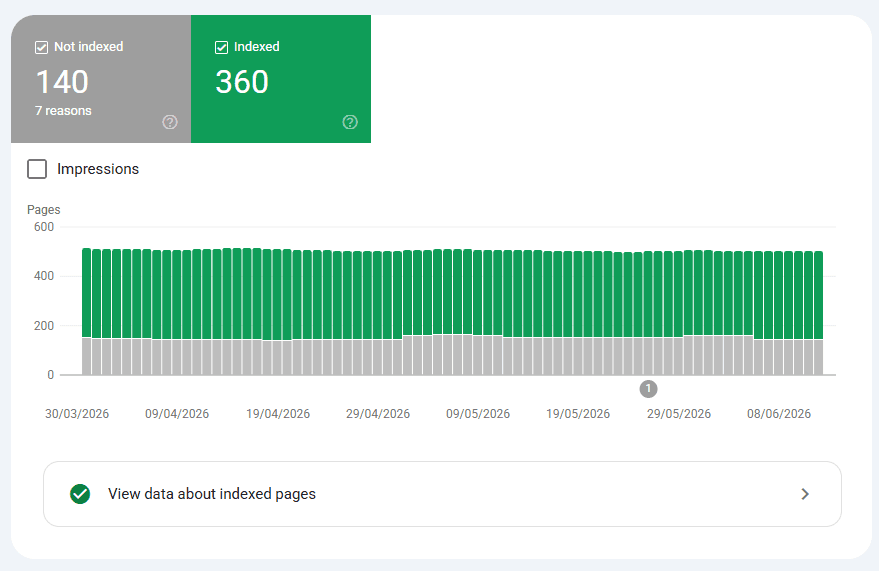
Is Google indexing your pages?
Start in Google Search Console. Go to Coverage (or Indexing in the newer interface) and check how many pages are indexed. Look for:
- Pages marked as excluded. These are pages Google has found but chosen not to index. Some exclusions are fine (like paginated archive pages), but if your key service pages or blog posts are excluded, that's a problem.
- Pages blocked by robots.txt. If your robots.txt file accidentally disallows important sections of your site, Google can't crawl them.
- Noindex tags. Individual pages can be set to noindex, meaning Google won't include them in search results. Check that this hasn't been applied to pages you actually want ranking.
A quick manual check: type site:yourdomain.co.uk into Google. The number of results shown gives you a rough count of indexed pages. If it's much lower than the number of pages you know you have, investigate.
Check your XML sitemap
Your sitemap tells Google which pages exist and helps it crawl your site efficiently. In Search Console, go to Sitemaps and confirm your sitemap has been submitted and processed without errors. If you haven't submitted one, most SEO plugins (including SEOPress, which I use on WordPress sites) will generate one for you automatically.
Is your site on HTTPS?
Every page on your site should be served over HTTPS, not HTTP. Type your domain into a browser and check the padlock. If you see a security warning, or if some pages load over HTTP while others use HTTPS, that's a technical issue to fix immediately. Mixed content is a subtler version of the same problem, where the page itself is HTTPS but some images or scripts load over HTTP.
Mobile-friendliness
Google uses mobile-first indexing, which means it primarily uses the mobile version of your site to determine rankings. In Search Console, check the Mobile Usability report. Common issues include text that's too small, buttons that are too close together, and content that overflows the screen width.
Page speed and Core Web Vitals
Run your homepage and a key service page through Google PageSpeed Insights. Pay particular attention to your Core Web Vitals:
- Largest Contentful Paint (LCP): How long it takes for the main content to appear. Should be under 2.5 seconds.
- Cumulative Layout Shift (CLS): Whether elements jump around as the page loads. Should be as close to zero as possible.
- Interaction to Next Paint (INP): How quickly the page responds to user input.
Common causes of poor scores include oversized images, too many third-party scripts (like chat widgets or excessive analytics tags), and slow hosting.
Step 2: Audit Your On-Page SEO
Once you're confident Google can access your site, turn your attention to whether each page is optimised to rank for the right terms.
Title tags
Your title tag is the blue clickable headline that appears in Google search results. It's arguably the single most important on-page SEO element. Every page on your site should have a unique title tag that:
- Includes the primary keyword for that page
- Is under 60 characters (longer titles get truncated in search results)
- Accurately describes what the page is about
- Is written to encourage clicks, not just tick an SEO box
Use Screaming Frog to export all title tags across your site in one go. Look for pages with missing titles, duplicates, or titles that are over 60 characters.
Meta descriptions
Meta descriptions don't directly influence rankings, but they do influence click-through rates. A higher CTR is a positive signal. Every page should have a unique meta description of under 155 characters that summarises the page content and gives the reader a reason to click. If you leave them blank, Google will pull its own text, which is often poorly formatted.
Heading structure
Each page should have exactly one H1 tag (usually the page title) and it should include the primary keyword. H2 and H3 subheadings help both Google and readers navigate the content. Check that your headings follow a logical hierarchy (H1 → H2 → H3) and that they're not just styled text with no actual heading tag applied.
Keyword usage
Your target keyword should appear naturally in the H1, in the first paragraph, and throughout the body content. Don't stuff it in. Google's algorithms are sophisticated enough to understand context and synonyms. The goal is relevance, not repetition.
URL structure
URLs should be short, readable, and keyword-relevant. Avoid long strings of numbers or auto-generated slugs like /?p=1234. A URL like /seo-services-london/ tells both Google and the reader exactly what the page is about.
Internal linking
Internal links help Google understand the structure of your site and distribute authority between pages. Check that your key pages have links pointing to them from other relevant pages on your site. A page with no internal links pointing to it (an "orphan page") is harder for Google to discover and prioritise. For more on how keyword choices feed into your content structure, take a look at why keyword research is so important.
Image alt text
Every image on your site should have a descriptive alt text attribute. This serves two purposes: it helps visually impaired users who rely on screen readers, and it tells Google what the image depicts. Screaming Frog can pull a list of all images with missing alt text across your whole site.
Step 3: Review Your Content
Google has become increasingly focused on content quality over the past few years. The Helpful Content updates have made it clearer than ever that content written primarily for search engines rather than for actual people is unlikely to rank well for long.
E-E-A-T
Google evaluates content against a framework called E-E-A-T: Experience, Expertise, Authoritativeness, and Trustworthiness. For a small business website, this means:
- Experience: Does the content reflect genuine first-hand knowledge? Sharing real examples, client results, or your own process goes a long way.
- Expertise: Is the content accurate, detailed, and written by someone who clearly knows their subject?
- Authoritativeness: Are other reputable sites linking to yours or mentioning your business?
- Trustworthiness: Does your site have clear contact details, a privacy policy, reviews or testimonials, and a professional appearance?
For most small businesses, improving E-E-A-T means adding author bios, getting more Google reviews, earning local backlinks, and making sure every page reflects real expertise rather than generic filler.
Thin and duplicate content
Thin content means pages with very little substantive information: a short paragraph, a contact form, and nothing else. While some pages legitimately don't need much copy (a thank-you page, for instance), key service pages and blog posts should have enough depth to genuinely answer the reader's question.
Duplicate content is when two or more pages contain the same or very similar text. This confuses Google about which version to rank and can dilute the authority of both pages. Check for:
- Pages accessible via both
wwwand non-wwwversions of your URL (only one should be canonical) - Products or services listed on nearly identical pages with only the location name changed
- Blog posts that cover the same topic with only superficial differences
Outdated content
Review your older blog posts and service pages. Are statistics still accurate? Are tools or processes you've mentioned still relevant? A page that references outdated information signals poor maintenance to both Google and readers. Updating older content is one of the highest-return activities in SEO, as it's much quicker than writing from scratch, and Google rewards freshness.
Step 4: Check Your Off-Page SEO
Off-page SEO is about the signals coming from outside your own website, primarily your backlink profile and your online reputation.
Your backlink profile
Backlinks are links from other websites pointing to yours. Google treats them as votes of confidence, but the quality of those votes matters far more than the quantity. A single link from a respected industry publication or a well-regarded local directory is worth more than dozens of links from low-quality sites.
In SE Ranking (or any backlink tool), check:
- How many referring domains you have. This is more meaningful than raw backlink count.
- The quality of those domains. Look for links from relevant, reputable sites in your industry or location.
- Any toxic or spammy links. If you have a large number of links from obviously low-quality sources, that can harm your rankings. These can be disavowed in Google Search Console.
For a deeper look at what backlinks mean for your rankings, my post on how to rank higher on Google covers this alongside other key factors.
Google Business Profile
If you're a local or service-area business, your Google Business Profile is an off-page SEO asset that directly affects your visibility in local search and Google Maps. During your audit, check that your profile:
- Is fully completed with accurate name, address, phone number, and website URL
- Has up-to-date business hours
- Has a good number of recent reviews (and that you're responding to them)
- Includes relevant photos and service descriptions
Consistency matters here. Your business name, address, and phone number should appear identically across your website, your Google Business Profile, and any other directories you're listed on.
How Often Should You Do an SEO Audit?
For most small businesses, a thorough audit once per quarter is a good rhythm. Google's algorithms update frequently, your competitors' sites change, and your own site evolves as new pages get added and old ones get neglected.
Outside of quarterly reviews, it's worth running a quick technical check any time you:
- Launch a new website or redesign an existing one
- Migrate to a new domain or hosting provider
- Add a significant volume of new pages (such as location pages or product listings)
- Notice a sudden drop in organic traffic
What to Do With Your Audit Results
An audit produces a list of issues, and that list can feel overwhelming if you try to tackle everything at once. Prioritise like this:
Fix immediately: Anything blocking Google from crawling or indexing key pages. Noindex tags on the wrong pages, robots.txt blocking your whole site, missing sitemaps, HTTPS errors.
Fix next: On-page issues on your most important pages: your homepage, main service pages, and highest-traffic blog posts. Look for missing title tags, duplicate meta descriptions, and poor heading structure.
Work through steadily: Content improvements, internal linking, image optimisation, and off-page work like building local citations and earning backlinks.
If you work through this process and find you've got a longer list than you have time to tackle, that's exactly where professional SEO support can make a difference. My SEO services are designed for small and local businesses who want results without the agency overhead.
Conclusion
An SEO audit isn't a one-off task. It's an ongoing habit. The businesses that consistently outrank their competitors aren't necessarily the ones spending the most on SEO. They're the ones who know their site inside out, fix problems early, and keep improving.
Start with the technical foundations, work through your on-page elements, review your content quality, and check your off-page signals. Take notes as you go, prioritise your fixes, and revisit every quarter.
If you'd like to see how your site is performing right now, run a free SEO audit. It takes under a minute.