
Here's a stat that should grab your attention: over 90% of web pages receive zero organic traffic from Google. Zero. Not a trickle — nothing at all.
This article is part of my small business guide to SEO.
It's not because those pages are poorly written or the businesses behind them aren't any good. It's because they're invisible. They're not optimised in a way that tells Google what they're about, who they're for, or why they deserve to rank.
If you run a small business — whether you're a plumber, a solicitor, a salon owner, or a local service provider — getting your website to rank higher on Google is one of the most valuable things you can do for your business. Unlike paid ads, organic rankings don't stop the moment you stop spending. Done right, they bring in leads consistently, month after month.
This guide walks you through exactly how to improve your Google ranking in practical terms, without the jargon. I've broken it down into seven core steps, so you know what to focus on first and what to build towards over time.
Why Google Ranking Matters for Your Business
Before we get into tactics, it's worth being clear on why this matters so much.
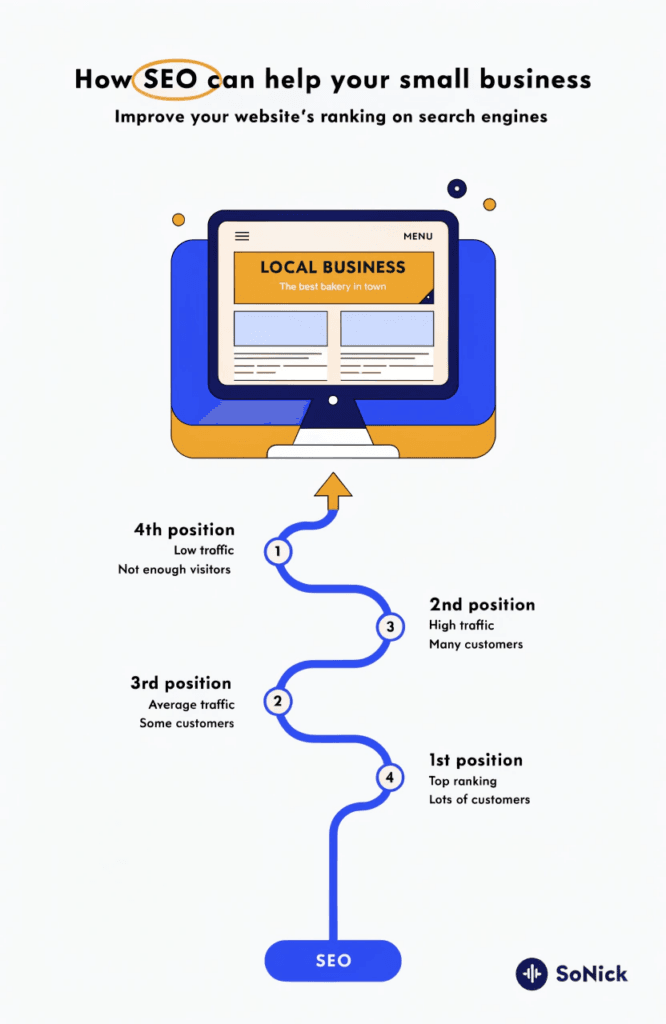
The top five results on Google capture the vast majority of clicks. If you're buried on page two or three, most potential customers will never find you — even if you offer exactly what they're looking for.
For local service businesses in particular, the stakes are high. A significant proportion of Google searches have local intent — people looking for a service "near me" or in a specific town. Appearing in those results, especially in the Google Maps local pack (the three business listings shown at the top), can drive a steady stream of ready-to-buy enquiries to your door.
The other advantage of organic search is the quality of the leads it brings. Someone who finds you through Google has actively searched for what you do. That's a very different kind of prospect from someone who sees a Facebook ad and might not be in the market at all.
How Google Actually Decides Who Ranks
Google's ranking system is built on three core ideas: relevance, authority, and user experience.
Relevance means your content clearly matches what someone is searching for. Google needs to understand what your page is about and who it's for.
Authority means your website is trusted — both by other websites (through links pointing to yours) and by Google itself, based on signals like how long your site has been established and whether your content demonstrates genuine expertise.
User experience means your site is fast, easy to use on mobile, and keeps visitors engaged rather than bouncing straight back to Google.
Underpinning all of this is something Google calls E-E-A-T: Experience, Expertise, Authoritativeness, and Trustworthiness. In plain terms, Google wants to show content from real experts who know what they're talking about — not thin, generic pages that could have been written by anyone.
Step 1 — Get Your Keyword Research Right
Everything in SEO starts with keywords. If you're targeting the wrong ones, no amount of effort elsewhere will make up for it.
The goal is to identify the exact phrases your potential customers type into Google when they're looking for what you offer. That sounds obvious, but a lot of businesses either target terms that are far too competitive (where they have no realistic chance of ranking) or miss the specific phrases their customers actually use.
Start with what I call seed keywords — the broad terms that describe your business. If you're a plumber in Bristol, that might be "plumber Bristol" or "emergency plumber Bristol." From there, look for long-tail keywords — more specific phrases that tend to be less competitive and often convert better because they signal clearer intent. "Boiler repair Bristol" or "bathroom installation Bristol quote" are good examples.
Understanding search intent is just as important as the keyword itself. Someone searching "how much does a boiler service cost" is in research mode. Someone searching "boiler service Bristol book online" is ready to act. Your page needs to match what the searcher actually wants at that moment.
A tool like SE Ranking makes keyword research far more manageable — you can check search volumes, see how competitive a term is, and find related phrases you might not have thought of. It's one of the most cost-effective options available for small business owners doing their own SEO.
If you want to understand why this step is so foundational, my guide on why keyword research is so important goes into more depth.
Step 2 — Nail Your On-Page SEO
Once you know which keywords to target, on-page SEO is about making sure each page on your site clearly communicates its topic to Google.
The key elements to get right on every page:
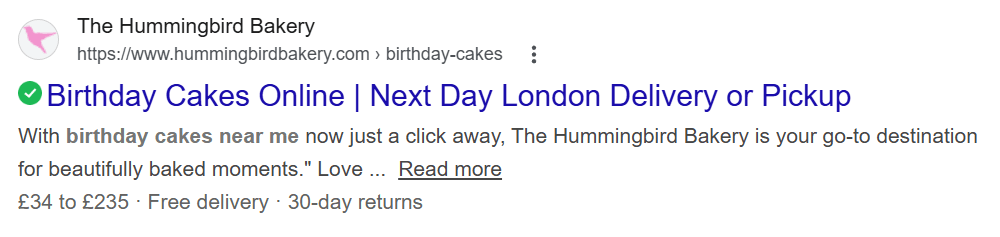
Title tag. This is the clickable headline that appears in Google search results. It should include your target keyword and be compelling enough that people actually want to click. Keep it under 60 characters so it doesn't get cut off. If you'd like a deeper look at this, I've written a full guide on what a title tag is and how to write one well.
Meta description. This is the short snippet of text that appears beneath your title in search results. It doesn't directly affect rankings, but it does affect whether people click. Make it clear, relevant, and include a reason to visit. Aim for under 155 characters. There's also a guide on writing meta descriptions on the blog if you want step-by-step help.
Headings. Use a single H1 that contains your primary keyword. Break the content up with H2 and H3 subheadings — these help both readers and Google understand the structure of the page.
URL structure. Keep URLs short, readable, and keyword-focused. /boiler-repair-bristol/ is better than /services/page-id-432/.
Image alt text. Every image on your page should have a descriptive alt text that tells Google (and screen readers) what the image shows. Include your keyword where it fits naturally.
Internal linking. Link from one page on your site to other relevant pages. This helps Google crawl your site and understand how your content is connected — and it keeps visitors exploring rather than leaving.
Step 3 — Sort Out Your Technical SEO
Technical SEO is about making sure Google can actually find, crawl, and understand your website — and that visitors have a smooth experience when they arrive.
The most important areas to address:
Site speed. Slow pages frustrate visitors and push Google to rank you lower. Compress your images, use a caching plugin if you're on WordPress, and choose reliable hosting. Aim for a Largest Contentful Paint (LCP) of under 2.5 seconds — this is Google's measure of how quickly the main content loads.
Mobile usability. More than 60% of Google searches happen on mobile. If your site is hard to navigate on a phone, you're losing both visitors and rankings. Test your site on your own phone regularly.
HTTPS. If your website still shows as HTTP rather than HTTPS, Google treats it as insecure. Make sure you have an SSL certificate in place — most hosting providers offer this free of charge.
Core Web Vitals. Google uses a set of user experience metrics called Core Web Vitals to assess page performance. You can check these for free in Google Search Console.
Sitemap and indexing. Submit an XML sitemap via Google Search Console so Google knows which pages to index. Check that no important pages are accidentally blocked from crawlers.
Step 4 — Create Content That Earns Its Ranking
Content quality has always mattered in SEO, but the bar has risen significantly. Google is increasingly good at identifying content written to rank rather than content written to genuinely help people.
The first thing to get right is search intent alignment. Before you write a page or post, ask: what does someone searching this keyword actually want to find? A blog post answering a question, a service page explaining what you offer, a comparison guide weighing up options — the format needs to match the intent.
From there, depth matters. Comprehensive, well-structured content that thoroughly covers a topic will consistently outperform thin pages. That doesn't mean padding things out with filler — it means actually answering the questions your readers have, anticipating follow-up questions, and providing specific, useful detail.
E-E-A-T signals are increasingly important too. Demonstrate real experience and expertise: include your own observations, specific examples from your work, and where appropriate, cite credible sources. A named author with a short bio adds trust. Keeping content updated — especially posts that reference statistics, tools, or timely information — signals to Google that your site is actively maintained.
Step 5 — Build Quality Backlinks
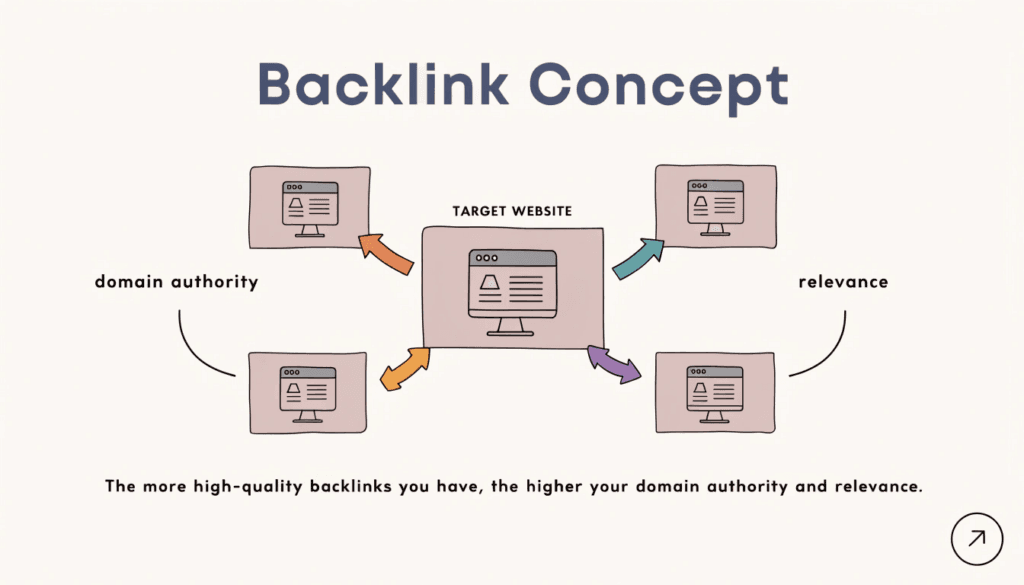
A backlink is a link from another website to yours. Google treats these as votes of confidence — if a reputable site links to you, it signals that your content is worth recommending.
Backlinks remain one of the strongest ranking signals, particularly for competitive keywords. But the quality of links matters far more than the quantity. A single link from a trusted, relevant website will do more for your rankings than dozens of links from low-quality directories.
The most reliable approaches for building links as a small business:
Create content worth linking to. Genuinely useful guides, original data, or practical tools naturally attract links over time. This post is an example of the kind of content that earns links — other websites will reference it when writing about SEO.
Guest posting. Write an article for a relevant industry website or local publication and include a link back to your site. Focus on sites with real audiences and genuine domain authority.
Niche edits. Reach out to website owners who have already published relevant content and ask if they'd consider adding a link to your resource. This works best when your content genuinely adds value to what they've written.
Digital PR. Get your business mentioned in online publications. This might come from sharing expertise as a source for a journalist, sponsoring a local event, or publishing a piece of original research.
Avoid buying links from link farms or using any approach that feels like gaming the system. Google's ability to detect manipulative link building has improved considerably, and penalties can be severe.
Step 6 — Optimise for Local Search
If you run a local business — a tradesperson, a salon, a solicitor's practice, a clinic — local SEO is where you can make the most immediate impact.
The centrepiece of local SEO is your Google Business Profile (formerly Google My Business). This is the listing that appears when someone searches for your business name, or when Google shows local results for service-based searches in your area. Getting it right is non-negotiable.
Make sure your profile is fully completed: business name, address, phone number, website, opening hours, service areas, and a clear description of what you do. Add photos — real ones, not stock images. Encourage happy customers to leave reviews, and take the time to respond to them. All of this sends positive signals to Google about the legitimacy and quality of your business.
Beyond your profile, consistency matters. Your business name, address, and phone number (NAP) should be identical across every online directory, citation, and social profile. Inconsistencies confuse Google and can suppress your local rankings.
For service businesses targeting specific towns or areas, location-specific pages on your website can help you rank for area-specific searches — for example, separate pages for each town you cover rather than a single generic "areas we cover" page.
Step 7 — Track Your Rankings and Act on the Data
SEO without measurement is guesswork. Once you've started implementing these steps, you need to track what's working and adjust accordingly.
The two essential free tools are Google Search Console and Google Analytics. Search Console shows which keywords your site is appearing for, how many clicks you're getting, and whether there are any technical issues Google has flagged. Analytics shows you what visitors do once they arrive — which pages they visit, how long they stay, and whether they take action.
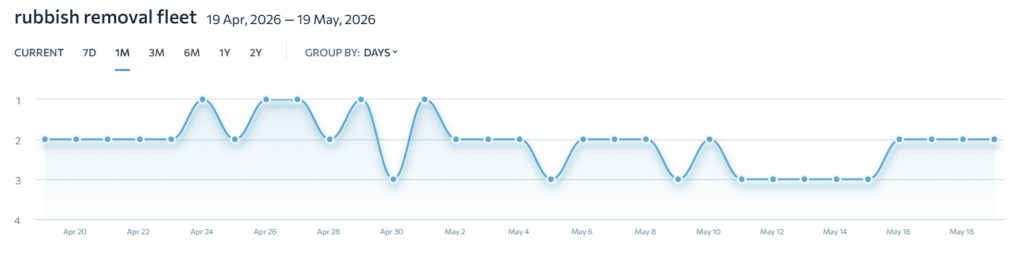
For more detailed rank tracking — monitoring exactly where you appear in Google for specific keywords over time — I use and recommend SE Ranking. It gives you a clear view of ranking movements, lets you track competitors, and includes keyword and site audit tools. It's one of the most accessible options for small business owners who want proper tracking without the price tag of enterprise tools.
Look at your data regularly — monthly at a minimum. Identify which pages are gaining ground, which have stalled, and which are attracting traffic but not converting. The insights you get from consistent monitoring will shape your next round of improvements far more effectively than any one-off tactic.
How Long Does SEO Take?
This is the question I get asked most often, and the honest answer is: it depends — but you should expect to wait at least three to six months before seeing meaningful results from a new SEO campaign.
That's not a reason to delay. SEO is cumulative. Every piece of content you publish, every technical issue you fix, every backlink you earn adds to a foundation that compounds over time. Businesses that start now will be ahead of competitors who wait until they "have more time."
That said, local SEO for a business with an established website and a clear geographic focus can move faster. I've seen well-optimised Google Business Profiles and targeted local landing pages produce visible results within weeks.
The key is consistency. SEO isn't a project you complete and put away — it's an ongoing process of creating content, earning links, and refining what you already have.
Frequently Asked Questions
How do I rank higher on Google quickly? There's no instant route to page one, but some actions have faster impact than others. Fixing technical issues, optimising existing pages that are already ranking on page two, and improving your Google Business Profile can all produce results relatively quickly. For new content and link building, patience is required.
How do I appear in Google Maps results? Ranking in Google Maps (the local pack) comes down to your Google Business Profile. Claim and verify it, complete every field, gather genuine reviews, and ensure your NAP details are consistent across the web. Proximity, relevance, and prominence are the three signals Google uses to determine local rankings.
Can I pay Google to rank higher in organic results? No. Google Ads can put your website at the top of results as a paid advertisement, but this has no effect on your organic ranking. If you'd like to explore paid advertising alongside your SEO efforts, take a look at our PPC and Google Ads services.
Does my website design affect my Google ranking? Yes, significantly. A well-designed website that loads quickly, works on mobile, and is easy to navigate contributes to better user experience signals — which Google factors into rankings. It also directly affects how many visitors convert into enquiries. If your site is outdated, a redesign may be one of the most impactful investments you can make. Our web design service is built specifically for small businesses that want a site that performs, not just looks good.
Conclusion
Ranking higher on Google is not about gaming the system or chasing algorithm updates. It's about building a website that genuinely deserves to rank: one that's relevant to what your customers search for, authoritative in its field, and easy to use.
The seven steps in this guide — keyword research, on-page SEO, technical SEO, content quality, backlinks, local SEO, and consistent tracking — are the foundation of every successful SEO campaign I run for clients. None of them are quick wins, but together they compound into results that paid advertising simply can't replicate.
If you'd like to see where your site stands right now, run a free SEO audit — it takes under a minute and gives you a clear starting point.