Most small business owners already have a list of keywords in their head before they've done a minute of research. And most of that list is wrong.
This article is part of my small business guide to SEO.
Not wrong in an embarrassing way — just wrong in a way that costs you traffic. You might be optimising for "plumber London" when the searches you could actually win are "emergency boiler repair Croydon" or "central heating installation south London." The gap between what you think people are searching for and what they're actually typing into Google can be enormous. Keyword research is how you close that gap.
Here's everything you need to know about finding the right keywords for your website — from what a keyword actually is, to the tools that make the job manageable.

What Is a Keyword?
A keyword is any word or phrase that someone types into a search engine. That's it. No magic, no mystery.
In practice, keywords are rarely single words. "Plumber" is a keyword. So is "emergency plumber available now in Manchester." The second one is what we call a long-tail keyword — it's longer, more specific, and usually signals that someone is much closer to making a decision.
When you use relevant keywords in your website content, you're telling Google what your pages are about. Google then matches your content to the searches it thinks you're most relevant for and ranks you accordingly. The closer your keywords are to what your potential customers are actually searching, the better your chances of appearing in front of the right people.
Why You Shouldn't Just Guess Your Keywords
Here's the uncomfortable truth: most business owners are pretty bad at guessing their own keywords.
It's not a criticism — it makes complete sense. You know your business inside out, so you naturally think in the language you use, not the language your customers use when they're searching online. A solicitor might want to rank for "litigation services," when their clients are actually typing "can I sue my landlord" into Google. A plumber might chase "hydronic heating installation" when people in their area search for "underfloor heating costs."
The only way to know what your customers are actually searching for is to look it up. That's what keyword research is for — and even a basic session with the right tools will throw up surprises.
What Makes a Good Keyword?
Not all keywords are worth targeting. Before you start building content or optimising pages around a term, check it against these three criteria:
Search volume. Does anyone actually search for this? A keyword with zero monthly searches will bring you zero visitors, regardless of how well you rank for it. You want terms with enough searches to be worth the effort — though "enough" varies by industry. A niche B2B service might do very well with 50 monthly searches; a local consumer business probably wants higher volumes.
Keyword difficulty. How competitive is the term? Highly competitive keywords are dominated by established websites with strong authority, making it extremely hard for a small business to break through. Targeting easier keywords — especially local or long-tail variations — gives you a far better chance of actually ranking.
Relevance and intent. Does the keyword match what your business offers, and does it match what the searcher actually wants? A search for "how to fix a leaky tap" is informational — the person wants a guide, not a plumber. A search for "emergency plumber Swansea" is commercial intent — they want someone to call right now. Both might be relevant to your plumbing business, but they need different types of content.
How to Find Keywords for SEO: Step by Step
Step 1: Brainstorm Your Seed Keywords
Start with the basics. Write down the core topics your business covers — your services, your location, the problems you solve. These become your "seed keywords": the starting point for everything else.
If you're a personal injury solicitor in Birmingham, your seeds might be: personal injury claim, accident at work compensation, whiplash claim Birmingham. If you run a hair salon in Leeds, you might start with: hair salon Leeds, balayage Leeds, keratin treatment near me.
Don't overthink this stage. You're just building a starting list to feed into your tools.
Step 2: Look at What Your Competitors Are Ranking For
One of the fastest ways to find keyword ideas is to see what's already working for your competitors. Find two or three businesses similar to yours that are ranking well in Google. Plug their websites into a keyword research tool (more on those below) and look at which keywords are driving traffic to their site.
You're not copying their strategy — you're finding the gaps between what they rank for and what you could do better.
Step 3: Use a Keyword Research Tool
This is where the real work happens. Keyword research tools pull data directly from Google and show you search volumes, difficulty scores, related terms, and trends. You don't have to pay a fortune to get useful data — there are solid free options, and some of the best paid tools are very affordable.
I cover the best tools in the section below.
Step 4: Analyse and Filter Your Results
Once you've got a list of potential keywords from your tools, you need to prioritise. Filter out terms that are too broad or too competitive for where your site is now. Focus on:
- Keywords with clear commercial or local intent
- Long-tail phrases with realistic difficulty scores
- Terms that match specific pages or content you can actually create
If you're just starting out with SEO, I'd recommend targeting keywords with a difficulty score under 40 and a reasonable search volume — even if that volume feels modest. Ranking on page one for a lower-competition term will always outperform sitting on page five for a high-competition one.
Step 5: Map Keywords to Pages
Every page on your website should target one primary keyword and a handful of supporting terms. Your homepage, service pages, location pages, and blog posts all need their own keyword focus — don't try to cram every keyword onto a single page. This process is called keyword mapping, and it's what turns a keyword list into an actual SEO strategy.
The Best Keyword Research Tools
Google Keyword Planner
Google Keyword Planner is free to use — you just need a Google Ads account to access it. Enter a keyword or your website URL and it generates a list of related terms along with average monthly search volumes, competition levels, and cost-per-click data. It's not the most detailed tool available, but for a starting point — especially if you're on a tight budget — it's perfectly capable.
One useful feature: you can look at historical data for the past 12 months, which helps you spot seasonal patterns in how people search.
SE Ranking
SE Ranking is my go-to recommendation for small business owners who want a proper keyword research tool without the price tag of the biggest platforms. It's paid, but significantly more affordable than Semrush or Ahrefs, and it comes with a free trial.
You can use it to research keywords from scratch, analyse competitor websites to see what they rank for, track your own rankings over time, and run full site audits. It covers everything a small business needs for SEO, in one place, without being overwhelming.
Google Search Console
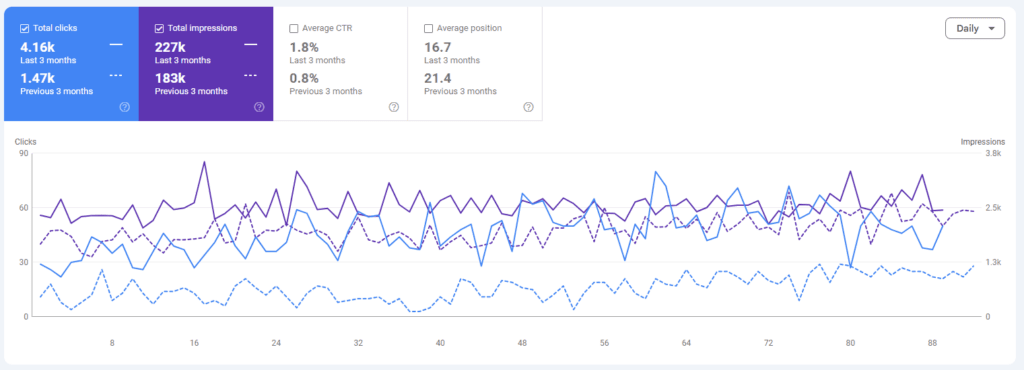
Google Search Console is free and essential — you should have it set up for your website regardless. Under the Performance section, you can see exactly which search queries are bringing people to your site, along with impressions, clicks, and average position.
This is particularly useful for finding keywords you're already ranking for but haven't fully optimised around. If you're appearing on page two for a term without having done any deliberate work on it, a bit of targeted effort could move you to page one.
Semrush
Semrush is one of the most comprehensive SEO tools available. It's more expensive than SE Ranking, but it covers keyword research, competitor analysis, backlink auditing, content marketing tools, and PPC — all in one platform. If your budget allows and you want maximum data depth, it's worth exploring. For most small businesses just getting started, SE Ranking will cover everything you need at a fraction of the cost.
What to Do With Your Keywords Once You Have Them
Finding keywords is only half the job. Once you have your list, you need to put them to work.
On your website pages: Include your primary keyword in the page title, the H1 heading, the meta description, and naturally throughout the body copy. Don't stuff keywords in — write for the reader first, and let the keywords fall into place.
In your blog content: Use informational keywords to fuel blog posts that answer the questions your customers are searching for. Over time, this builds your authority in Google's eyes and drives consistent traffic to your site. I've written more about this in why keyword research is so important for your business.
For long-tail and local terms: Create specific pages for specific searches. A general "plumbing services" page is a lot harder to rank than a "boiler installation Bristol" page. The more specific you get, the more realistic your chances of ranking.
If you want to understand how keywords tie into the bigger picture of getting found online, my post on how to rank higher on Google is a good next step.
Start With the Data, Not Your Best Guess
Keyword research doesn't need to be complicated. Pick a free tool, spend an hour exploring what people are actually searching for in your industry, and you'll immediately have a clearer picture of where to focus your efforts. The business owners who do even this basic step consistently outperform those who don't.
The goal isn't to rank for everything — it's to rank for the right things. And the right things are what your actual customers are typing into Google when they need someone like you.
If you'd like to see how your site is currently performing for the searches that matter to your business, run a free SEO audit — it takes under a minute and gives you a clear starting point.