Most small businesses are competing for customers online with a fraction of the budget that larger companies throw at advertising. The good news is that SEO levels that playing field. Unlike paid ads, where visibility stops the moment your budget runs out, organic search traffic compounds over time. Get it right and your website keeps bringing in enquiries around the clock, without paying for every click.
This article is part of my small business guide to SEO.
But "get it right" is doing a lot of work in that sentence. There is a lot of SEO advice online that is either outdated, too vague to act on, or written for businesses with a dedicated marketing team. This guide is for small business owners who want practical, specific steps they can actually follow.
Here are the SEO tips that genuinely make a difference.

Why SEO Matters More for Small Businesses Than You Might Think
Paid advertising works, but the costs have risen sharply over the past few years. For a small business with a limited budget, spending £500 or more per month on Google Ads is a significant commitment and one that stops producing results the moment you pause the campaign.
SEO is different. It requires effort upfront and results take time to materialise, but once you are ranking for the right keywords, that traffic does not stop when your budget runs dry. For local service businesses in particular, the returns from consistent SEO far outpace what most small businesses can achieve through paid channels alone.
There is also the matter of trust. Most people skip past paid ads and click on the organic results. Ranking well signals credibility in a way that buying ad space does not. Your potential customers are searching for what you offer right now. The question is whether they can find you.
Set Up Your Tracking Before You Do Anything Else
This is the step most small businesses skip, and it is the one that makes everything else harder.
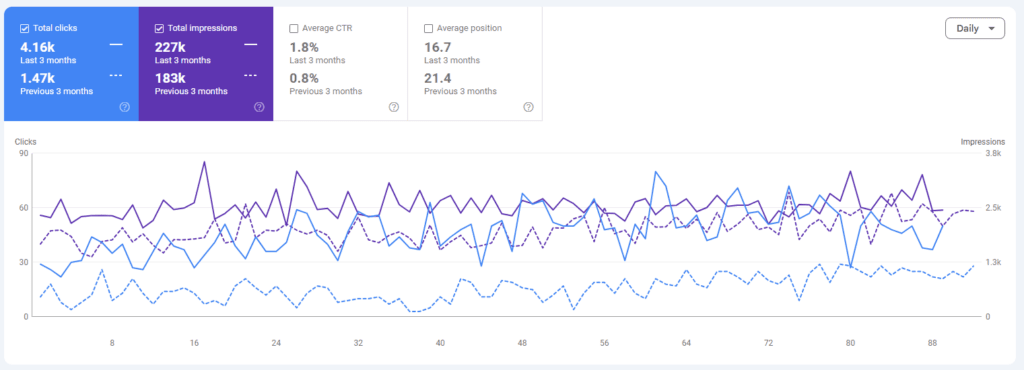
Before you change a single thing on your website, install Google Search Console and Google Analytics 4. Both are free. Search Console shows you which keywords your site is appearing for, how many people are clicking through, and whether Google is encountering any technical problems with your pages. GA4 shows you what visitors do once they arrive: which pages they land on, how long they stay, and whether they take any action.
Without these tools, you are guessing. With them, you can see exactly what is working and where you are losing people. Set them up before you do anything else and check them at least monthly.
Optimise Your Google Business Profile
If you run a local service business and you only do one thing on this list, make it this.
Your Google Business Profile is the listing that appears in Google Maps and in the local pack of results when someone searches for a service near them. It is completely free, and a properly optimised profile can drive significant enquiries without ranking your website at all.
Here is what a fully optimised profile looks like:
- Business name, address and phone number filled in accurately and matching what appears on your website
- Business category set correctly (choose the most specific primary category that fits your business)
- Services listed with descriptions and, where possible, prices
- Opening hours set, including any variations for bank holidays
- Photos uploaded of your premises, your team, and examples of your work
- Posts published regularly using the update or offer post types
- Questions answered in the Q&A section
- Reviews actively requested from satisfied customers (more on this below)
The businesses that appear at the top of the local pack are not necessarily the ones with the best websites. They are the ones with the most complete, most actively managed profiles. This is one of the fastest wins available to any small business.
Get Your On-Page Basics Right
On-page SEO refers to the elements on each page of your website that tell Google what the page is about. Many small business websites have been built without any thought given to these, which means they are missing easy ranking opportunities.
The key elements to check on every important page:
Title tag. This is the text that appears as the clickable headline in search results. Every page should have a unique title tag that includes the target keyword and stays under 60 characters. A page titled "Home" tells Google nothing. A page titled "Plumber in Guildford | 24-Hour Emergency Callouts" tells Google exactly what it needs to know. I have a dedicated post on how to write a title tag if you want to go deeper on this.
Meta description. The short summary that appears below the title in search results. It does not directly affect your ranking, but it does affect whether someone clicks. Keep it under 155 characters, include the keyword, and give people a reason to click. Read my guide on how to write a meta description for a full walkthrough.
H1 heading. Each page should have one H1 heading that includes the target keyword. This is usually the main headline visible at the top of the page.
URL structure. Keep URLs short, readable and keyword-relevant. /plumber-guildford/ is better than /page?id=47.
Image alt text. Every image should have a descriptive alt text that explains what the image shows. This helps Google understand your content and improves accessibility.
None of these are complicated. But they are routinely neglected on small business websites, and getting them right gives you a clean foundation to build on.
Do Proper Keyword Research (and Stop Guessing)
One of the most common mistakes I see small business owners make is assuming they know which keywords to target. Often they are targeting keywords that are either too competitive, too vague, or not what their customers actually type.
Keyword research is the process of finding out what your potential customers are actually searching for and understanding how competitive those terms are. There are a few ways to approach it:
Start with your services. Write down every service you offer, then think about how a customer might search for it. Someone who needs a boiler replaced might search "boiler replacement [town]" or "new boiler cost" or "how much does a boiler replacement cost" depending on where they are in their decision-making process.
Go long-tail. Long-tail keywords are longer, more specific phrases with lower search volumes but much lower competition. A local business has very little chance of ranking for "plumber" but a strong chance of ranking for "emergency plumber in Fleet, Hampshire". I wrote a full guide on what long-tail keywords are and why they matter if you want to understand the strategy in more depth.
Use a keyword research tool. Tools like SE Ranking let you check real search volumes, see how competitive a keyword is, and discover related terms you may not have thought of. This takes the guesswork out of the process entirely.
Avoid keyword stuffing. Repeating your target keyword excessively does not help you rank and can actively harm your site. Google is sophisticated enough to understand context. Write naturally and use variations of your keyword rather than repeating the exact same phrase.
Each page on your website should target a different keyword. If multiple pages target the same term, they compete with each other and you end up cannibalising your own rankings.
Focus on Local SEO
For most small businesses, the customers you want are nearby. Local SEO is specifically about making your business visible to people searching in your area.
Beyond your Google Business Profile, local SEO involves:
Citations. A citation is any mention of your business name, address and phone number (often called NAP) on another website. Local business directories, trade association listings, and industry directories all count. The key is consistency: your NAP details should be identical across every listing. Even small variations (abbreviated street names, different phone number formats) can weaken the signals Google uses to verify your business location.
Local landing pages. If you serve multiple towns or areas, a dedicated page for each location helps you rank for searches in those areas. A single "contact us" page with your address listed at the bottom will not rank for "[service] in [town]" searches across multiple locations.
Local content. Writing about topics that are relevant to your local area gives you a natural way to include location-specific keywords and signals to Google that you are genuinely embedded in the community you serve.
If you want to understand how citations and local SEO work in practice, my guide to local lead generation for small businesses goes into more detail.
Create Content That Answers Real Questions
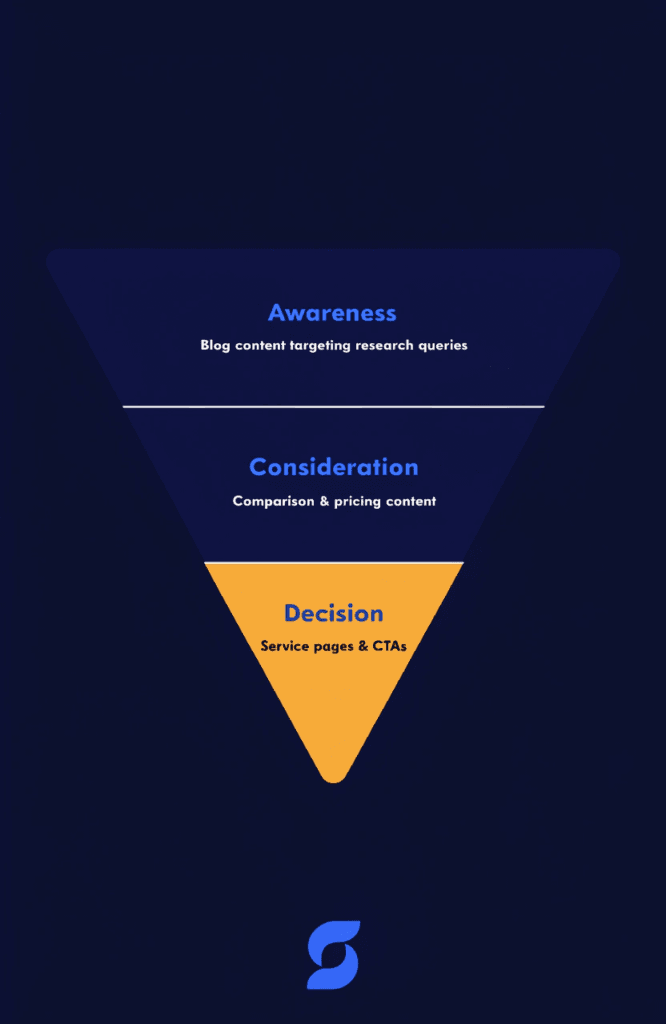
Your website's service pages target customers who are ready to buy. But there is a much larger group of people who are earlier in the process, researching their options, comparing prices, or trying to understand what they need. Blog content is how you capture that audience.
Think about the questions your customers ask you regularly. What does a boiler service actually involve? How long does it take to redesign a website? What should a solicitor cost for a house purchase? Every one of those questions is a blog post opportunity.
Good blog content does three things for your SEO:
- It gives you the chance to rank for keywords that your service pages cannot target without looking forced
- It builds topical authority, which signals to Google that your site is a credible source on your subject area
- It keeps visitors on your site longer and gives them more opportunities to contact you
You do not need to publish every day. A single well-researched, genuinely useful article every two to four weeks will outperform a dozen thin, quickly written posts. Quality beats volume every time.
Build Your Online Reputation
Reviews are one of the most powerful local ranking signals available to small businesses and also one of the most overlooked.
Google treats reviews as a trust signal. A business with 50 reviews and a 4.8-star rating will consistently outrank a competitor with five reviews, assuming everything else is roughly equal. More importantly, reviews influence whether potential customers actually contact you after finding you in the results.
The most effective way to get more reviews is simply to ask. Send a follow-up message to satisfied customers with a direct link to your Google review page. Most people who had a good experience are happy to leave a review if the process is made easy for them.
Beyond Google, reviews on relevant industry platforms (Checkatrade and Trustpilot for trades, for example) add additional credibility and create further citation opportunities for your business.
Those directory listings matter for AI search as well. When I tested 10 local searches in ChatGPT against Google, directories like Checkatrade were cited as sources for most of them. If you run a trade business, I've also covered how ChatGPT finds local tradespeople.
One word of warning: never buy reviews or incentivise customers to leave positive reviews in exchange for discounts. Google will remove them, and you risk having your Business Profile suspended.
Sort Your Technical Foundations
Technical SEO covers the behind-the-scenes factors that affect how Google crawls, indexes and ranks your pages. You do not need to become a developer to address the basics, but you do need to know they exist.
The key areas to check:
| Technical Factor | What to Check |
|---|---|
| Page speed | Does your site load in under 3 seconds? Use Google PageSpeed Insights to test it. |
| Mobile-friendliness | Does your site work properly on a phone? Google indexes mobile-first. |
| HTTPS | Is your site secure? An insecure site (HTTP) will be flagged in browsers and deprioritised in search. |
| Crawlability | Can Google access all your important pages? Check for any "noindex" tags on pages that should be indexed. |
| Broken links | Internal or external links pointing to non-existent pages harm user experience and waste crawl budget. |
| Sitemap | Does your site have an XML sitemap submitted to Google Search Console? This helps Google discover your pages. |
If you are on WordPress, many of these issues can be identified and resolved without touching code. Plugins like SEOPress handle much of the on-page technical layer, and tools like Google Search Console will flag crawl errors directly.
Think of SEO as a Long-Term Investment
The single biggest mistake small business owners make with SEO is expecting results within a few weeks and giving up when they do not see them.
SEO takes time. For a brand new website in a competitive market, it can take six to twelve months before you see significant organic traffic. For an established site making targeted improvements, you might see movement in eight to twelve weeks. It depends on your market, your competition, and how consistently you apply the work.
The businesses that win at SEO are the ones that treat it as an ongoing discipline rather than a one-off task. Publishing content regularly, keeping your Business Profile active, earning reviews, and building links steadily over time compounds in ways that short bursts of activity never will.
The good news is that once you are established, the results are durable. A well-ranking page can bring in enquiries for years with minimal maintenance. That is the return on investment that makes SEO worth the effort for small businesses.
Where to Start
If you are new to SEO, the list above might feel overwhelming. You do not have to tackle everything at once. Here is a sensible order of priority:
- Set up Google Search Console and GA4
- Claim and fully optimise your Google Business Profile
- Fix your title tags and meta descriptions across your main service pages
- Do keyword research for your core services and make sure each page targets a distinct keyword
- Start building citations in relevant directories
- Begin publishing blog content that answers your customers' questions
- Actively request reviews from satisfied customers
- Address any technical issues flagged in Search Console
Work through these in order and you will have a far stronger SEO foundation than the majority of small businesses in your area.
If you would like to see how your site is currently performing before you start, run a free SEO audit and get a clear picture of where the gaps are. It takes under a minute.